Defining Resources
Select the panel named LambdaBackedApiGatewayApi. Your screen should like something like this:
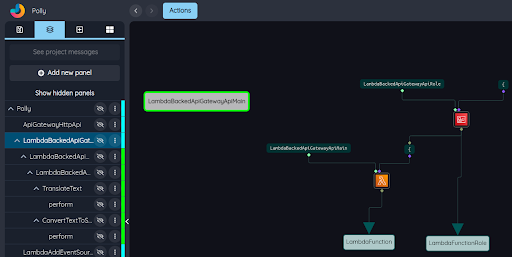
This infrastructure panel (note the cyan bar to the right of its name in the panel browser) defines two resources. These nodes are highlighted (by selecting them) here:
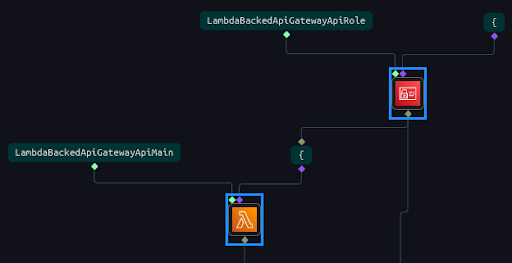
The two highlighted nodes are called resource definition nodes. They use familiar AWS icons to indicate the AWS service they are associated with. The orange node defines a Lambda function, and the red node defines an IAM role.
The port structure of a resource definition node is as follows:
| Name | Type | Description | Optional |
|---|---|---|---|
ID |
(cfnId) |
user or logical id |
no |
Specification |
(cfnSpec) |
CloudFormation template fragment |
yes |
| Name | Type | Description | Optional |
|---|---|---|---|
logicalID |
(cfnIdLogical) |
logical id for the resource |
no |
Every resource defined in a project has a primary definition, and may have secondary definitions as well. The primary definition receives the user id of the resource – the name by which the resource is known to the user – in its first parameter port. In this case, the two user ids are LambdaBackedApiGatewayApiRole and LambdaBackedApiGatewayApiMain. The second input parameter to the resource definition node specifies the resource using CloudFormation syntax. You can double click on the green CFN node labeled "{" in the upper right corner of the diagram to see the CloudFormation template fragment inside it:
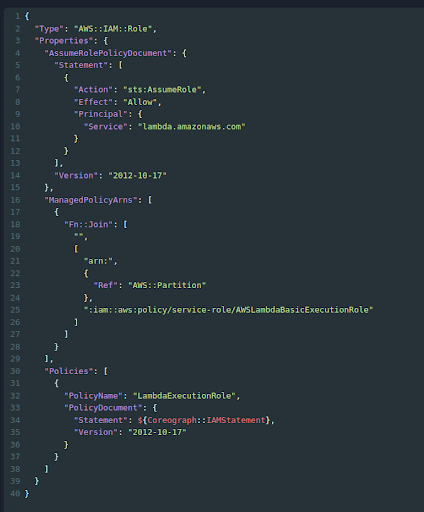
Sometimes the logical id of one resource is used in the CloudFormation template fragment for another resource. That is the case here; the logical id of the IAM role (bottom output port of the red IAM role node) is delivered as a parameter to the CFN node that is, in turn, a parameter to the Lambda function. If you double click on this CFN node, you will see a $0 in the text – that is replaced by the value of the parameter to the CFN node, which in this case is the logical id of the IAM role.